AI Tools and Dashboards Training Course

- Lifetime Access
- All Levels
- PDF Certificate
Learn with Confidence









Overview
AI Tools and Dashboards Training Course
Overview
Welcome to the AI Tools and Dashboards Training Course — the ultimate, in-depth program designed to help you master today’s most powerful AI platforms through structured workflows, practical comparisons, and hands-on dashboard navigation.
The AI Tools and Dashboards Training Course is not just another AI overview. It is a comprehensive training experience that teaches you how to operate, compare, and strategically leverage major AI systems including ChatGPT, Meta AI, Perplexity AI, Gemini, and Claude — all within their respective dashboards.
If you’ve ever felt overwhelmed by the rapid growth of AI tools, confused about which platform to use, or uncertain how to move from unstructured prompts to professional outputs, the AI Tools and Dashboards Training Course is built specifically for you.
This AI Tools and Dashboards Training Course focuses on:
-
Working with unstructured prompts
-
Editing and refining outputs
-
Managing dashboards effectively
-
Understanding output settings and configurations
-
Comparing features across platforms
-
Leveraging unique capabilities within each system
-
Conducting a final structured comparison using NotebookLM
Instead of learning tools in isolation, the AI Tools and Dashboards Training Course teaches you to think critically about platform selection, dashboard navigation, and output control.
By the end of the AI Tools and Dashboards Training Course, you will confidently:
-
Choose the right AI tool for the right task
-
Manage editing environments efficiently
-
Customise outputs to match professional standards
-
Compare AI platforms strategically
-
Understand dashboard strengths and limitations
-
Build repeatable workflows across multiple AI systems
The AI Tools and Dashboards Training Course transforms you from a casual user into a strategic AI operator.
Course Description
The AI Tools and Dashboards Training Course is structured around real-world usage. Each module explores how a specific AI tool handles prompts, editing, formatting, and special features inside its dashboard environment.
Rather than teaching theory, the AI Tools and Dashboards Training Course focuses on practical interaction with:
-
ChatGPT
-
Meta AI
-
Perplexity AI
-
Gemini
-
Claude
-
NotebookLM for final analysis
The goal of the AI Tools and Dashboards Training Course is simple: mastery through comparison and execution.
Let’s break down what you will learn.
ChatGPT Modules
Module0001 – ChatGPT: Working with Unstructured Prompts
The AI Tools and Dashboards Training Course begins with ChatGPT and the art of working with unstructured prompts.
You will learn:
-
How ChatGPT interprets vague inputs
-
Techniques to refine unclear instructions
-
How to guide outputs without rigid frameworks
-
When unstructured prompting is beneficial
Inside the AI Tools and Dashboards Training Course, you’ll discover that unstructured prompts can produce powerful results when managed correctly.
Module0002 – ChatGPT: Editing Content Using Canvas
The AI Tools and Dashboards Training Course teaches you how to use Canvas for document editing.
You will:
-
Edit long-form content
-
Expand and condense text
-
Apply structured revisions
-
Maintain clarity across iterations
The AI Tools and Dashboards Training Course ensures you use ChatGPT Canvas like a professional editing workspace.
Module0003 – ChatGPT: Managing and Reviewing Output Edits
Editing is not enough — reviewing edits strategically matters.
The AI Tools and Dashboards Training Course teaches:
-
Comparing versions
-
Reviewing suggested edits
-
Managing document changes
-
Maintaining consistency
This module ensures the AI Tools and Dashboards Training Course strengthens your editorial discipline.
Module0004 – ChatGPT: Key Features and Special Capabilities
You will explore:
-
File uploads
-
Image interpretation
-
Formatting tools
-
Special workflow capabilities
The AI Tools and Dashboards Training Course highlights what makes ChatGPT unique within the AI ecosystem.
Meta AI Modules
Module0005 – Meta AI: Using Simple Unstructured Prompts
The AI Tools and Dashboards Training Course transitions to Meta AI, examining how it handles simple prompts.
You will compare responsiveness, clarity, and structure within the AI Tools and Dashboards Training Course framework.
Module0006 – Meta AI: Core Editing Tools Explained
The AI Tools and Dashboards Training Course breaks down Meta AI’s editing features and dashboard controls.
Module0007 – Meta AI: Understanding Output Options
Output options vary across platforms.
The AI Tools and Dashboards Training Course teaches you how Meta AI manages response variations and adjustments.
Module0008 – Meta AI: Platform Highlights and Unique Features
You will identify Meta AI’s unique strengths inside the AI Tools and Dashboards Training Course comparison structure.
Perplexity AI Modules
Module0009 – Perplexity AI: Handling Unstructured Prompts
The AI Tools and Dashboards Training Course explores how Perplexity AI interprets open-ended queries.
Module0010 – Perplexity AI: Built-In Editing Tools
You will examine editing features available within the Perplexity dashboard as part of the AI Tools and Dashboards Training Course.
Module0011 – Perplexity AI: Exploring Output Configurations
The AI Tools and Dashboards Training Course explains how Perplexity allows output refinement and configuration.
Module0012 – Perplexity AI: Notable Features and Mentions
Special features such as source citations and research depth are covered within the AI Tools and Dashboards Training Course.
Gemini Modules
Module0013 – Gemini: Creating with Unstructured Prompts
Inside the AI Tools and Dashboards Training Course, you will explore Gemini’s interpretation of unstructured prompts.
Module0014 – Gemini: Editing and Refinement Tools
You will analyse Gemini’s refinement tools and compare them to other systems in the AI Tools and Dashboards Training Course.
Module0015 – Gemini: Output Settings and Variations
The AI Tools and Dashboards Training Course teaches how to customise Gemini outputs for tone and structure.
Module0016 – Gemini: Key Functional Highlights
This module highlights Gemini’s unique features inside the AI Tools and Dashboards Training Course ecosystem.
Claude Modules
Module0017 – Claude: Working with Unstructured Prompts
The AI Tools and Dashboards Training Course explores how Claude handles open-ended instructions.
Module0018 – Claude: Editing Tools and Document Control
You will learn how Claude manages documents and structured editing inside the AI Tools and Dashboards Training Course.
Module0019 – Claude: Output Formatting and Customisation
Formatting precision is key. The AI Tools and Dashboards Training Course covers Claude’s formatting strengths.
Module0020 – Claude Artifacts: Special Features and Applications
Artifacts allow advanced output types. The AI Tools and Dashboards Training Course demonstrates practical use cases.
Final Module
Module0021 – Final Comparison and Overall Analysis with NotebookLM
The AI Tools and Dashboards Training Course concludes with a structured comparison using NotebookLM.
You will:
-
Analyse strengths and weaknesses
-
Compare editing systems
-
Evaluate dashboard usability
-
Determine best use cases
This final analysis ties together everything learned in the AI Tools and Dashboards Training Course.
Who Is This Course For?
The AI Tools and Dashboards Training Course is ideal for:
Professionals
Who want to integrate multiple AI systems into workflows.
Content Creators
Who need advanced editing and formatting control.
Researchers
Who compare outputs across platforms.
Business Owners
Who want to choose the right AI system strategically.
Students
Who want AI literacy across major platforms.
If you want clarity instead of confusion, the AI Tools and Dashboards Training Course is for you.
Frequently Asked Questions (FAQ)
1. Is the AI Tools and Dashboards Training Course beginner-friendly?
Yes. The AI Tools and Dashboards Training Course starts with unstructured prompts before advancing to complex comparisons.
2. Does the AI Tools and Dashboards Training Course compare multiple AI systems?
Absolutely. Comparison is a central focus of the AI Tools and Dashboards Training Course.
3. Will I learn dashboard navigation?
Yes. The AI Tools and Dashboards Training Course covers dashboard features extensively.
4. Does the AI Tools and Dashboards Training Course teach editing workflows?
Yes. Editing and refinement are major components of the AI Tools and Dashboards Training Course.
5. Will I understand platform differences after completing the AI Tools and Dashboards Training Course?
Yes. The final NotebookLM comparison ensures you clearly understand strengths and limitations.
Final Thoughts
The AI landscape is expanding rapidly. Without structured training, it is easy to become overwhelmed.
The AI Tools and Dashboards Training Course gives you clarity, structure, and mastery.
Instead of jumping randomly between AI platforms, you will:
-
Understand each dashboard
-
Compare output quality
-
Master editing systems
-
Control formatting
-
Choose tools strategically
If you want to confidently navigate ChatGPT, Meta AI, Perplexity AI, Gemini, and Claude — and understand how they differ — the AI Tools and Dashboards Training Course is your complete roadmap.
Enroll today in the AI Tools and Dashboards Training Course and take control of the AI ecosystem with confidence and expertise.
Course Content
Module0001 – ChatGPT: Working with Unstructured Prompts
-
ChatGPT: Working with Unstructured Prompts
00:00
Module0002 – ChatGPT: Editing Content Using Canvas
Module0003 – ChatGPT: Managing and Reviewing Output Edits
Module0004 – ChatGPT: Key Features and Special Capabilities
Module0005 – Meta AI: Using Simple Unstructured Prompts
Module0006 – Meta AI: Core Editing Tools Explained
Module0007 – Meta AI: Understanding Output Options
Module0008 – Meta AI: Platform Highlights and Unique Features
Module0009 – Perplexity AI: Handling Unstructured Prompts
Module0010 – Perplexity AI: Built-In Editing Tools
Module0011 – Perplexity AI: Exploring Output Configurations
Module0012 – Perplexity AI: Notable Features and Mentions
Module0013 – Gemini: Creating with Unstructured Prompts
Module0014 – Gemini: Editing and Refinement Tools
Module0015 – Gemini: Output Settings and Variations
Module0016 – Gemini: Key Functional Highlights
Module0017 – Claude: Working with Unstructured Prompts
Module0018 – Claude: Editing Tools and Document Control
Module0019 – Claude: Output Formatting and Customisation
Module0020 – Claude Artifacts: Special Features and Applications
Module0021 – Final Comparison and Overall Analysis with NotebookLM

Hear from Our Successful Learners


The experience has been excellent from the start to the present. The support team is proactive and always helpful with any queries or requests.

I've taken several courses through Reed and have been completely satisfied with each one. The pricing is outstanding.

I've completed numerous courses through Reed and have been fully satisfied with each one. The courses are excellent.

I'm truly impressed by One Education's remarkable ability to understand its learners and go the extra mile for them.

I had been searching for a Level 3 course for a while—it felt like mission impossible. Discovering that Reed offers a wide range of career-focused providers was a pleasant surprise.

The course was incredibly insightful and easy to navigate. I truly enjoyed it—thank you so much.


Booking was simple and the course content was clear and well structured from day one.

Great value for money and the certificate arrived quickly after I finished my assessment.

Customer support answered my questions the same day. Would definitely recommend to a friend.

Flexible learning that fit around my job. The video lessons were easy to follow.

Second course I've taken with them now. Consistent quality every time.

Clear instructions, fair pricing, and the exam prep really helped me pass first time.
Frequently Asked Questions
Get Your Certificate Today
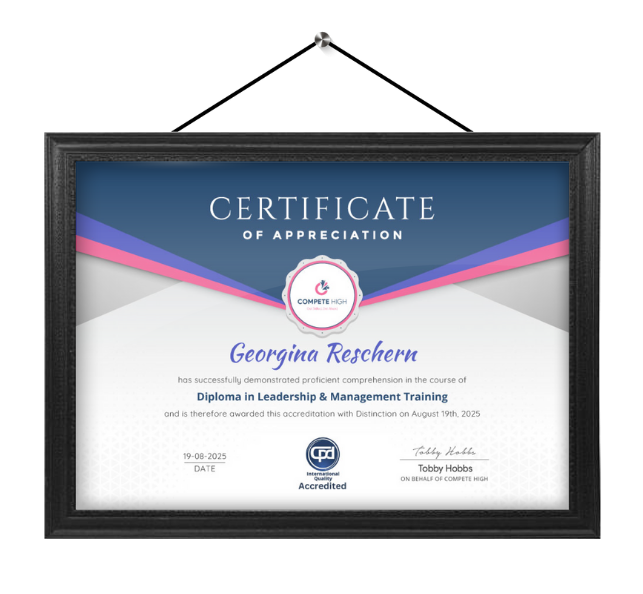
Celebrate your achievement with a CPD-IQ accredited certificate from Compete High! Perfect for showcasing your skills, boosting your career, and enhancing your professional profile. Choose the format that works best for you: PDF Certificate (£9.99) – Download instantly to add to your portfolio, résumé, LinkedIn, or share on social media. Printed Hard Copy (£29.99) – A beautifully designed certificate delivered to your door, ready to proudly display in your office or home. Both PDF & Printed Hard Copy (£31.99) – Get the best of both worlds!
Order Now