Introduction to Live Streaming – Camtasia, Final Cut Pro X, and Wirecast
- Lifetime Access
- All Levels
- PDF Certificate
Learn with Confidence





Overview
The demand for live streaming expertise has skyrocketed across media, marketing, and entertainment industries. The Introduction to Live Streaming – Camtasia, Final Cut Pro X, and Wirecast course is designed to equip learners with essential live streaming skills quickly and efficiently. Unlike traditional video production or streaming courses, this program is short, practical, and results-focused, enabling learners to complete it fast and earn a certificate in a very short time.
This course introduces you to three powerful tools—Camtasia, Final Cut Pro X, and Wirecast—while providing practical knowledge for creating professional live streams, webinars, and virtual events. With the Introduction to Live Streaming – Camtasia, Final Cut Pro X, and Wirecast course, learners gain job-ready skills that prepare them for careers in digital media, social media marketing, event broadcasting, and content creation.
Description
The Introduction to Live Streaming – Camtasia, Final Cut Pro X, and Wirecast course is a concise and hands-on program designed to teach learners how to plan, record, edit, and broadcast high-quality live streams using industry-standard tools. The course emphasizes workflow efficiency, video quality, and audience engagement.
Learners will gain practical knowledge on setting up live streams, managing video feeds, integrating graphics, and producing content suitable for platforms such as YouTube, Facebook Live, Twitch, and professional webinar services. In addition to tool-specific techniques, the course teaches best practices for live streaming, including audio management, lighting, camera setup, and real-time troubleshooting.
A standout feature of the Introduction to Live Streaming – Camtasia, Final Cut Pro X, and Wirecast course is its fast-track format. Designed to be shorter than other similar courses, learners can finish quickly, earn a certificate, and immediately apply their skills in professional or freelance roles. This approach makes it perfect for job seekers, students, and content creators who want to become job-ready efficiently.
By the end of the course, learners will be confident in creating, editing, and broadcasting professional live streams while using multiple software platforms effectively. This provides a tangible advantage for employment, freelance opportunities, or personal content creation endeavors.
Curriculum
Module 1: Introduction to Camtasia for Live Streaming
Learn the basics of Camtasia, including recording, editing, and preparing content for live streaming.
Module 2: Editing and Post-Production in Final Cut Pro X
Gain essential video editing skills to enhance live stream quality, create engaging content, and ensure polished production.
Module 3: Setting Up and Broadcasting with Wirecast
Master Wirecast’s interface, including live switching, graphics, and scene management for professional streams.
Module 4: Integrating Audio, Video, and Graphics
Learn how to synchronize audio, manage multiple cameras, and use graphics overlays for a professional presentation.
Module 5: Optimizing Streams for Platforms
Understand how to configure live streams for YouTube, Facebook Live, Twitch, and other platforms for maximum reach.
Module 6: Troubleshooting Common Live Streaming Issues
Learn practical solutions for buffering, audio lag, and technical errors to ensure smooth broadcasts.
Assignment:
Plan, produce, and broadcast a live stream using Camtasia, Final Cut Pro X, and Wirecast, demonstrating full competency and job-ready skills.
Who Is This Course For?
The Introduction to Live Streaming – Camtasia, Final Cut Pro X, and Wirecast course is ideal for:
-
Job seekers looking to enter digital media, content creation, or live streaming roles
-
Freelancers and entrepreneurs wanting to create professional online events or webinars
-
Students and graduates seeking job-ready skills in multimedia production
-
Social media managers aiming to boost engagement through live content
-
Content creators interested in producing professional-level live streams
This course is perfect for learners who want fast, actionable results. Its short duration allows you to earn a certificate quickly and start applying your skills immediately, making you job-ready in a fraction of the time required by traditional programs.
FAQ
Q: How long does it take to complete the Introduction to Live Streaming – Camtasia, Final Cut Pro X, and Wirecast course?
A: The course is designed to be completed quickly, making it much shorter than traditional live streaming or video production programs. Most learners finish in a short time and receive their certificate promptly.
Q: Do I need prior experience with video production or live streaming?
A: No. The Introduction to Live Streaming – Camtasia, Final Cut Pro X, and Wirecast course is beginner-friendly and provides step-by-step guidance on using the software tools effectively.
Q: Will this course help me get a job?
A: Yes. The course teaches job-ready skills in live streaming production, video editing, and broadcasting, which are highly valued in digital media, marketing, and content creation roles.
Q: Is this course practical or theoretical?
A: The course is highly practical, focusing on real-world application and hands-on experience rather than abstract theory.
Q: How is this course different from other live streaming courses?
A: Introduction to Live Streaming – Camtasia, Final Cut Pro X, and Wirecast is shorter, focused, and designed for fast certification. It emphasizes producing professional-quality streams quickly, helping learners become job-ready efficiently.
Q: Is the course online and self-paced?
A: Yes. The course is fully online and self-paced, allowing learners to study anytime and complete it according to their schedule.
Master live streaming, video editing, and broadcasting with Introduction to Live Streaming – Camtasia, Final Cut Pro X, and Wirecast. Complete the course quickly, earn a recognized certificate, and gain practical, job-ready skills that prepare you for success in digital media, content creation, and online events.
Hear from Our Successful Learners


The experience has been excellent from the start to the present. The support team is proactive and always helpful with any queries or requests.

I've taken several courses through Reed and have been completely satisfied with each one. The pricing is outstanding.

I've completed numerous courses through Reed and have been fully satisfied with each one. The courses are excellent.

I'm truly impressed by One Education's remarkable ability to understand its learners and go the extra mile for them.

I had been searching for a Level 3 course for a while—it felt like mission impossible. Discovering that Reed offers a wide range of career-focused providers was a pleasant surprise.

The course was incredibly insightful and easy to navigate. I truly enjoyed it—thank you so much.


Booking was simple and the course content was clear and well structured from day one.

Great value for money and the certificate arrived quickly after I finished my assessment.

Customer support answered my questions the same day. Would definitely recommend to a friend.

Flexible learning that fit around my job. The video lessons were easy to follow.

Second course I've taken with them now. Consistent quality every time.

Clear instructions, fair pricing, and the exam prep really helped me pass first time.
Frequently Asked Questions
Get Your Certificate Today
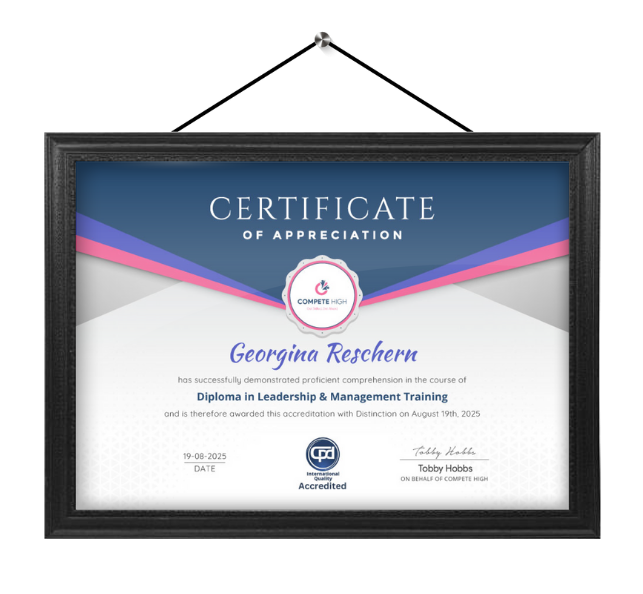
Celebrate your achievement with a CPD-IQ accredited certificate from Compete High! Perfect for showcasing your skills, boosting your career, and enhancing your professional profile. Choose the format that works best for you: PDF Certificate (£9.99) – Download instantly to add to your portfolio, résumé, LinkedIn, or share on social media. Printed Hard Copy (£29.99) – A beautifully designed certificate delivered to your door, ready to proudly display in your office or home. Both PDF & Printed Hard Copy (£31.99) – Get the best of both worlds!
Order Now