Google Workspace Training
- Lifetime Access
- All Levels
- PDF Certificate
Learn with Confidence









Overview
Google Workspace Training – Get Certified Fast and Become Job-Ready
Overview of the Google Workspace Training Course
The Google Workspace Training course is a fast, focused, and career-oriented program designed to help learners master Google Workspace efficiently and become job-ready in record time. Unlike traditional courses that stretch over months, this Google Workspace Training course is intentionally shorter, enabling you to complete it quickly and earn a professional certificate fast.
Google Workspace is an essential suite of productivity tools used by businesses, organizations, and educational institutions worldwide. From Google Docs and Sheets to Slides and Drive, professionals who can efficiently navigate and leverage Google Workspace are in high demand. The Google Workspace Training course equips you with practical, job-ready skills to boost productivity, streamline workflows, and stand out in the workplace.
With the Google Workspace Training course, you don’t just learn the tools—you learn how to use them effectively in real-world work scenarios. Whether you’re aiming for a new job, looking to improve your current work efficiency, or want a professional certification, this course is designed to deliver results quickly.
Description of the Google Workspace Training Course
The Google Workspace Training course is built for learners who want to gain professional-level skills in Google Workspace without committing to long, drawn-out programs. This course provides a complete roadmap to mastering Google Workspace, from file management to collaborative workflows, ensuring you can apply these skills immediately in professional settings.
The course begins with Module 01: Getting Started with Google Workspace, where you will get an overview of the suite, its applications, and how it can improve your productivity. You will then move on to Module 02: Managing Files and Folders in Google Drive, learning how to organize, store, and retrieve documents efficiently.
In Module 03: Performing Common Tasks in Google Docs, Google Sheets, and Google Slides, the Google Workspace Training course teaches you core skills across all major apps. You will then dive deeper into specific applications with Module 04: Working in Google Docs, Module 06: Working in Google Sheets, and Module 07: Working in Google Slides, learning advanced functions and time-saving techniques that are highly valued in the workplace.
Collaboration is a key component of Google Workspace, and Module 05: Sharing and Collaborating on Files ensures you understand how to work effectively with teams, manage permissions, and streamline group workflows. Finally, Module 08: Organising Your Life teaches you how to integrate Google Workspace into your personal and professional routines for maximum efficiency.
What sets this Google Workspace Training course apart is its efficiency. Many similar courses are long and theoretical, requiring weeks or months to complete. This Google Workspace Training course is shorter than other comparable courses, allowing you to gain a certificate quickly while acquiring practical, job-ready skills.
By the end of the Google Workspace Training course, you will have a professional understanding of Google Workspace and the confidence to apply it in real-world work environments, making you an attractive candidate for employers.
What You Will Learn in the Google Workspace Training Course
The Google Workspace Training course curriculum is designed to deliver maximum value in a short period:
Module 01: Getting Started with Google Workspace
Learn what Google Workspace is, its applications, and how it can improve productivity in professional settings.
Module 02: Managing Files and Folders in Google Drive
Understand file organization, storage, and retrieval best practices to work efficiently in Google Drive.
Module 03: Performing Common Tasks in Google Docs, Google Sheets, and Google Slides
Gain practical skills across all key Google Workspace applications to manage documents, data, and presentations effectively.
Module 04: Working in Google Docs
Master advanced features in Google Docs, including formatting, templates, and collaboration tools.
Module 05: Sharing and Collaborating on Files
Learn how to share documents, manage permissions, and collaborate with colleagues seamlessly.
Module 06: Working in Google Sheets
Develop essential spreadsheet skills, formulas, and data management techniques used in real-world jobs.
Module 07: Working in Google Slides
Create professional presentations using templates, visual tools, and collaborative features.
Module 08: Organising Your Life
Learn strategies for integrating Google Workspace into your daily routines to maximize productivity and personal efficiency.
Each module in the Google Workspace Training course focuses on practical skills that you can immediately apply in a professional or educational setting, making you job-ready faster than traditional courses.
Who Is This Google Workspace Training Course For?
The Google Workspace Training course is ideal for:
-
Job seekers looking to improve their employability with Google Workspace skills
-
Professionals seeking to enhance productivity and collaboration in the workplace
-
Students and graduates who want practical, career-ready skills
-
Freelancers offering administrative, data, or presentation services
-
Career switchers looking to gain workplace productivity expertise quickly
-
Anyone who wants a fast-track course with a professional certification
If your goal is to gain job-ready skills quickly and demonstrate competence in one of the world’s most widely used productivity suites, the Google Workspace Training course is perfect for you.
Why Choose This Google Workspace Training Course?
The biggest advantage of the Google Workspace Training course is speed and efficiency. While traditional Google Workspace courses can take weeks or months, this Google Workspace Training course allows you to:
-
Complete the course quickly
-
Get certified incredibly fast
-
Become job-ready in a short period
-
Apply your skills immediately in professional workflows
The course is practical and career-focused, teaching only the essential tools and techniques that employers value. By the end of this Google Workspace Training course, you will be confident in using Google Workspace to manage files, collaborate with teams, analyze data, and create professional documents and presentations.
Course Content
Module 01 Getting Started with Google Workspace
-
Getting Started with Google Workspace
00:00
Module 02 Managing Files and Folders in Google Drive
Module 03 Performing Common Tasks in Google Docs, Google Sheets, and Google Slides
Module 04 Working in Google Docs
Module 05 Sharing and Collaborating on Files
Module 06 Working in Google Sheets
Module 07 Working in Google Slides
Module 08 Organising Your Life

Hear from Our Successful Learners


The experience has been excellent from the start to the present. The support team is proactive and always helpful with any queries or requests.

I've taken several courses through Reed and have been completely satisfied with each one. The pricing is outstanding.

I've completed numerous courses through Reed and have been fully satisfied with each one. The courses are excellent.

I'm truly impressed by One Education's remarkable ability to understand its learners and go the extra mile for them.

I had been searching for a Level 3 course for a while—it felt like mission impossible. Discovering that Reed offers a wide range of career-focused providers was a pleasant surprise.

The course was incredibly insightful and easy to navigate. I truly enjoyed it—thank you so much.


Booking was simple and the course content was clear and well structured from day one.

Great value for money and the certificate arrived quickly after I finished my assessment.

Customer support answered my questions the same day. Would definitely recommend to a friend.

Flexible learning that fit around my job. The video lessons were easy to follow.

Second course I've taken with them now. Consistent quality every time.

Clear instructions, fair pricing, and the exam prep really helped me pass first time.
Frequently Asked Questions
Get Your Certificate Today
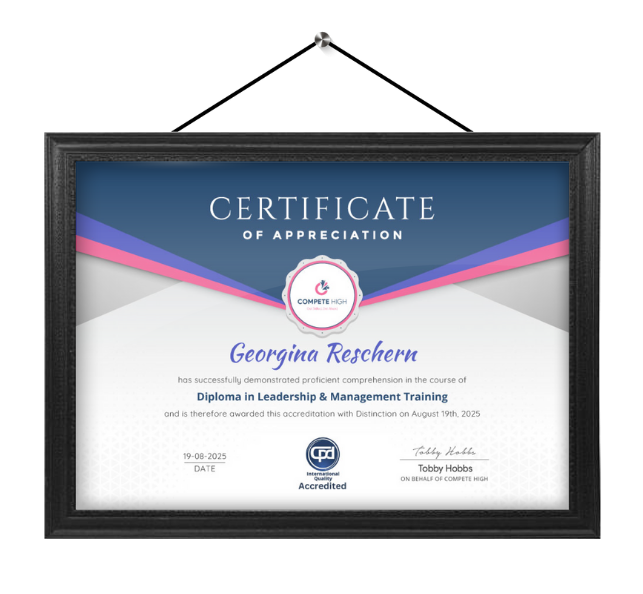
Celebrate your achievement with a CPD-IQ accredited certificate from Compete High! Perfect for showcasing your skills, boosting your career, and enhancing your professional profile. Choose the format that works best for you: PDF Certificate (£9.99) – Download instantly to add to your portfolio, résumé, LinkedIn, or share on social media. Printed Hard Copy (£29.99) – A beautifully designed certificate delivered to your door, ready to proudly display in your office or home. Both PDF & Printed Hard Copy (£31.99) – Get the best of both worlds!
Order Now